
The Multiple File Hell
Why this post?
I have worked with multiple companies that manage from mid- to high data volumes and one of the most common issues I have seen is too many unexpert data engineers writing thousands of low size datafiles. It happens from financial institutions to logistics one.
Sometimes is hard to get a good assumption of how many files should my dataset be splitted. It depends of the format, the way the data is partitioned and the application. Unfortunately sometimes the engineer don’t take care of this or even doesn’t matter.
Let we start!
What’s the Multiple file Hell?
Like the hell is your personal hell, your multiple file hell is depends of your data processing system, the kind of file you take as an input, your table formating.
As it have normally multiple factors we offten need to move to the best practices stated by the data processing system creators or even the dataformat creators but always keeping the same mantra “less files are better”.
For this propose here I’m going to focus in specific but well spread technologies like parquet as data format, Spark for data processing and hive for querying. Also take for metric proposes the data storage, as the read and write times for this blog.
If you ever had read the parquet specification It looks a little contraintuitive to create big size data files. You even can think binary columnar formats like parquet should be lighter but it’s a trap. Parquet have a lot of boilerplate (each file saves schema definitions, head block definitions, footers)
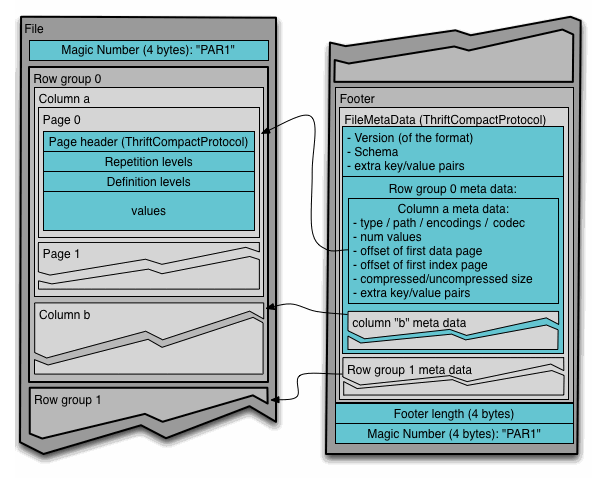
it’s surpricing the amount of metadata for this light fingerprint data format. If you read the parquet specification recommended sizes should be between 512MB to 1GB. a good recomentation is to manage an equivalence between HDFS and the file in the terms of 1GB parquets rowgroup should be 1GB of HDFS Block or the same “1 HDFS block per rowgroup”. It requires both Block storage and parquet configuration but we take care of the the magic number that’s 1073741824
How to modify parquet block size
just use the spark.hadoop.parquet.block.size property, this changes the default parquet size, but is not enoght we need to modify the block storage “block size” to get the 1 to 1 equivalence and this is the hard configuration due it depends on the technology you’re currently using.
spark.hadoop.parquet.block.size=1073741824
HDFS
For self managed block storage technologies like HDFS you could configure the dfs.block.size property on hdfs-site.xml.
<configuration>
    <property>
        <name>dfs.block.size</name>
	    <value>1073741824</value>
    </property>
</configuration>
EMR
For some cloud data processing systems, like EMR you could be able to modify HDFS block size in a similar way by reconfiguration.json
    {
      "ClusterId": "j-MyClusterID",
      "InstanceGroups": [
        {
          "InstanceGroupId": "ig-MyMasterId",
          "Configurations": [
            {
              "Classification": "hdfs-site",
              "Properties": {
                "dfs.blocksize": "1g"
              },
              "Configurations": []
            }
          ]
        }
      ]
    }
For object storages as AWS, GCS and serverless like Glue
For AWS and GCS there’s the spark.hadoop.fs.s3a.block.size and spark.hadoop.fs.gs.block.size properties that manages this behavior. Due object storages are not a block storage there’re some differences in the way the data is stored but it shows a significant improvement in the performance when you change this value from its default to the proposed one.
spark.hadoop.fs.s3a.block.size=1073741824
spark.hadoop.fs.gs.block.size=1073741824
Lets start de example
As Linus Torvalds saids “Talk is cheap, show me the code” In this example we’re going to generate some different sets of synthetic data using the Rust Eficient Parquet Synthetic data generation tool datahobbit.
For this example I decide to use 20 million of registers using the next command
datahobbit --records 20000000 --format parquet --max-file-size 10485760 schema.json dataset_20M_registers
using the next schema to simulate a real life report
{
  "columns": [
    { "name": "id", "type": "integer" },
    { "name": "first_name", "type": "first_name" },
    { "name": "last_name", "type": "last_name" },
    { "name": "email", "type": "email" },
    { "name": "phone_number", "type": "phone_number" },
    { "name": "age", "type": "integer" },
    { "name": "bio", "type": "sentence" },
    { "name": "is_active", "type": "boolean" }
  ]
}
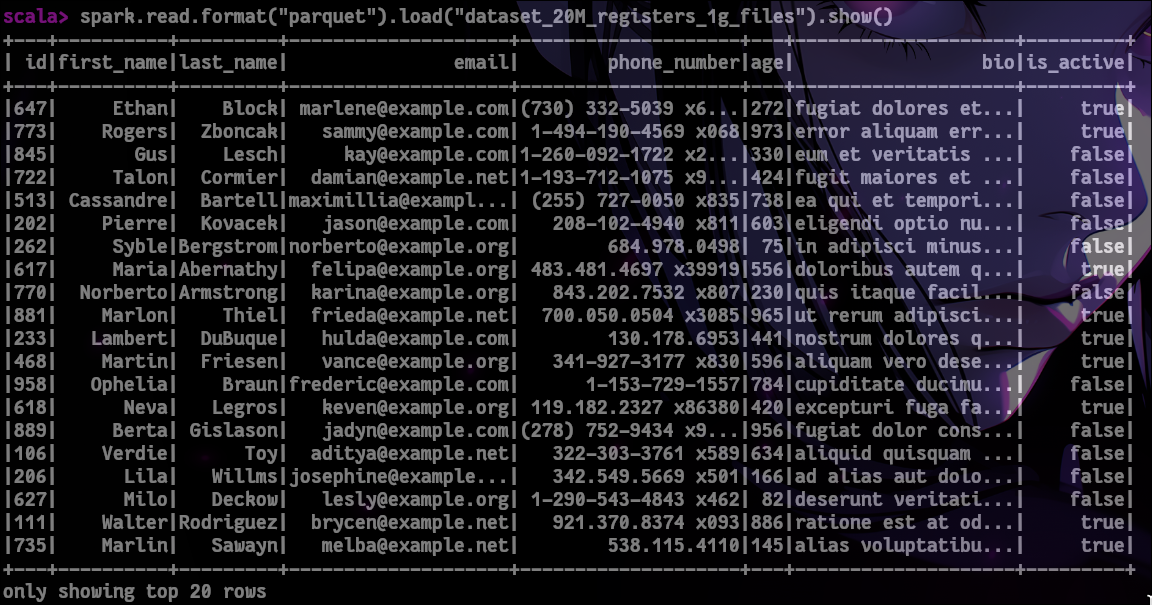
A sample of synthetic data looks like this
Write example
As you expected we’re going to use Apache Spark and some of each configuration we have talked early about.
HDFS
References
- Parquet Specification
- Parquet Configuration
- HDFS Design - Data Blocks
- EMR Configure Applications
- Hadoop-AWS
- Google Cloud Blog: Question 3
- Datahobbit Project
- [Optimizing Performance of Spark Workloads ]